Keybinds and hotbars
The faces of a macro: a key for the hands, a button for the eyes.
Keybinds
Open the Editors window and choose Keybinds; a play window’s Keys menu opens it too, working for that character. For at the top picks every character’s keys or one character’s own. Every key in effect is listed, with what it does and where that came from. A key is bound to one of:
| Binding | What it does |
|---|---|
"commands" | Commands sent to the game, a chain: its waits and behaviour words carried out. |
{ fill = "text" } | Text put in the command line for you to finish. |
{ action = "name" } | One of Hydra’s own actions: switch set, open a drawer, lock. |
{ macro = "name" } | Run the macro of that name. |
Keys come in sets, 0 to 9, and a key switches which set is in use. A
macro’s own key, set on the Macros page, is listed among the keybinds as
macro: <name> in the set it names, or in every set when it names none,
so a key two things claim is seen. A keybind in the keys file wins over a
macro’s key on the same chord.
A send keybind’s text is a chain, as a macro’s commands are: its waits,
rt, ct and behaviour words are carried out. For a condition, a
countdown or a button, make a macro and bind the key to it.
Hotbars
A hotbar is a grid of slots, and each slot holds a macro. The macro is the button: its label, its icon, its colours, what it counts down, the looks its states give it, and what a press sends are all set on the Macros page. The bar is only the layout: its grid, the size of its buttons, and which macro sits in which slot. A macro looks and works the same on every bar it is on. A press runs the macro when its condition holds. While it does not, the button is drawn dim, and a press sends nothing.
Open the Editors window and choose Hotbars: Menu › Editors › Hotbars. Every bar is listed on the left, the character’s own and everyone’s; the bar chosen is drawn on the right as its widget draws it, and under that its slots. Click a slot and pick the macro it holds, or empty; drag a slot onto another to move it there. Macros page opens the macros, to make one or change how it looks. Pictures for buttons are kept on the Icons page of the same window.
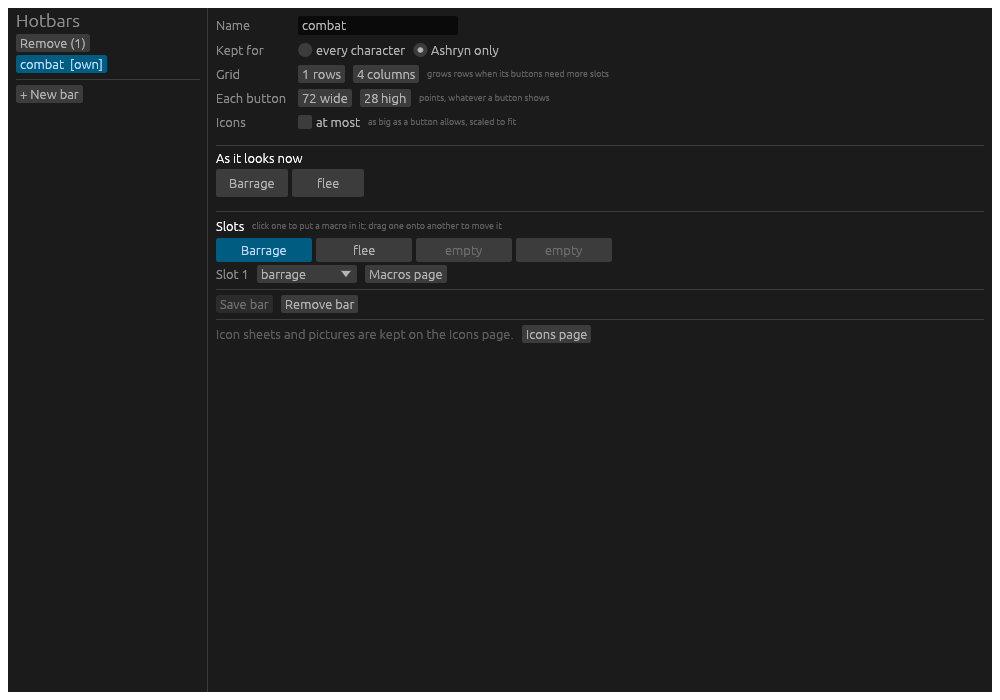
A bar need not be on the screen for its keys to work: a macro’s key is the macro’s. The Hotbar widget on a play window shows the bars you choose to see.
Bars made before, by an earlier Hydra or brought from Vellum, had
buttons with commands and looks of their own. The first time Hydra
starts, each such button becomes a macro, named after its label, in the
macros file beside the bar’s file, and its slot holds that macro. A
button that already ran a macro gives the macro its label, icon, colours
and states, where the macro had none. Both files as they were are kept
beside them, ending .before-macros.
The controller
A controller’s binds are keybinds too, and may press a button or run a macro. The Controller page of the Editors window holds them.
From the command line
| Line | What it does |
|---|---|
.hotbar combat attack | Presses the bar combat’s button that holds the macro attack, as a click would. |
.macro barrage | Runs the macro. |
.hotbars | Opens the hotbar editor. |
.alias | The aliases, where a macro’s word is kept. |