Log a character in
The first time, you log in with your account, and Hydra lists its characters for you to play. After that, a character starts with a click.
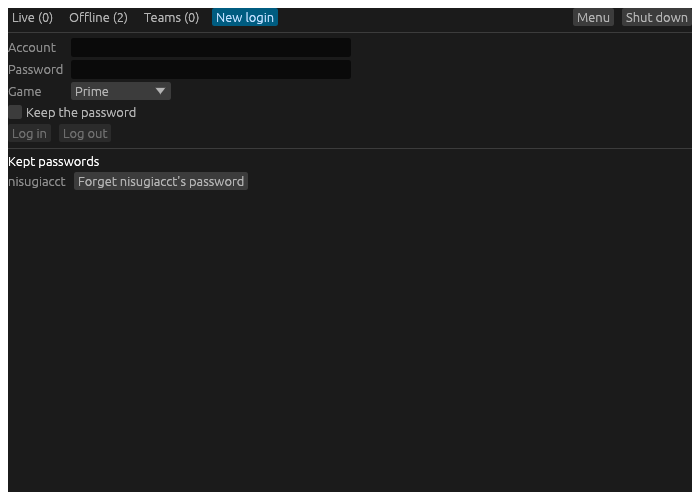
- Start Hydra. The hub opens.
- Choose the New login tab.
- Type your Account and Password, and choose the Game: Prime, Shattered or Prime Test.
- Tick Keep the password if you want Hydra to start this account’s characters without asking for it again. It is kept in your computer’s keyring (Credential Manager on Windows, the Keychain on a Mac, GNOME Keyring or KDE Wallet on Linux), and only once the game has accepted it.
- Choose Log in. Hydra asks the game for the account’s characters and lists them under the form.
- Choose Play beside a character. Hydra logs it in and opens its play window.
Once the game has let a character in, it is on your roster: the characters Hydra knows, listed on the hub’s Offline tab whenever they are not playing. Add puts a character on the roster without playing it, and the star marks a favourite, which is listed first.
The next time
Open the hub’s Offline tab. A character whose password is kept has Start. One without has a password box, its own Keep box, and Log name in. On Windows, the tray’s Start a character starts any character whose password is kept.
Forgetting
Forget on a character’s card takes it off the roster. Under Kept passwords on the New login tab, the Forget button beside an account takes its password out of the keyring.
Log out on the New login tab clears the account the form logged in, and its list. Characters already playing go on playing.