The hub
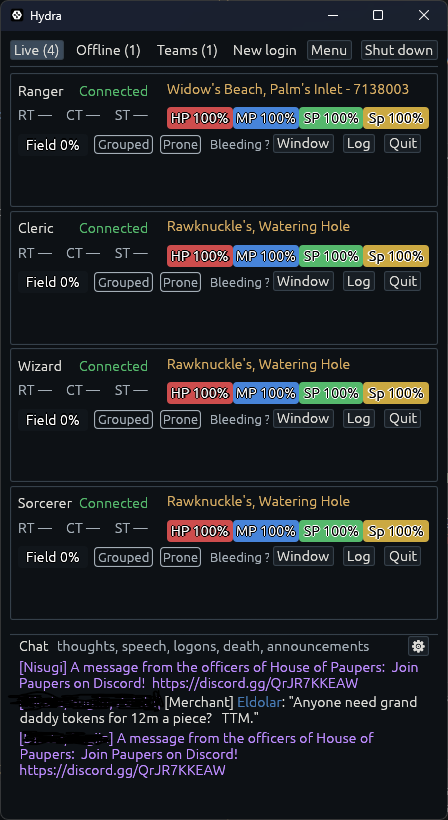
The hub is where characters are started, watched and stopped. It opens when Hydra starts, and closing it never stops a character.
Its tabs
- Live: a card for each character playing, or reconnecting. A card shows the character and its connection, its health, mana, stamina and spirit, its roundtime, room and group, and Window, Log and Quit. The Chat card beside them gathers what every character hears on the shared channels (thoughts, speech, arrivals, deaths and announcements), each line marked with who heard it. Its ⚙ chooses the channels and the characters.
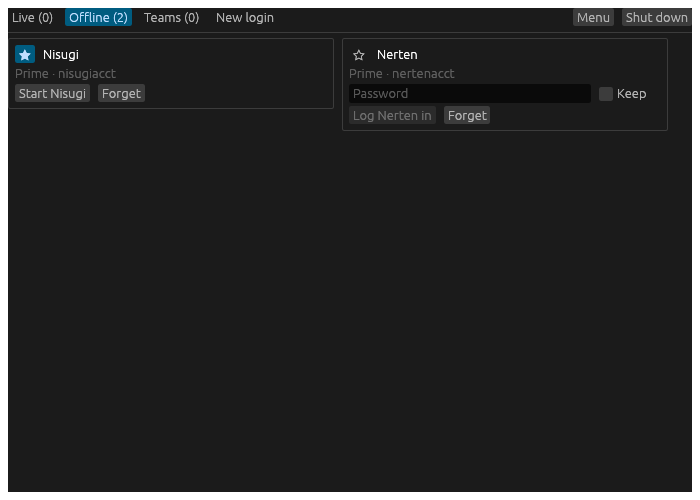
- Offline: first the characters that stopped this run, with why, and Reconnect, Remove or Log. Then the rest of your roster, favourites first, each with Start or a password box.
- Teams: characters started together with one click. See Start a team.
- New login: an account’s characters, and the kept passwords. See Log a character in.
A card’s Window opens that character’s play window, or brings it to the front. Log opens what the character has read. Quit quits the game.
The Menu
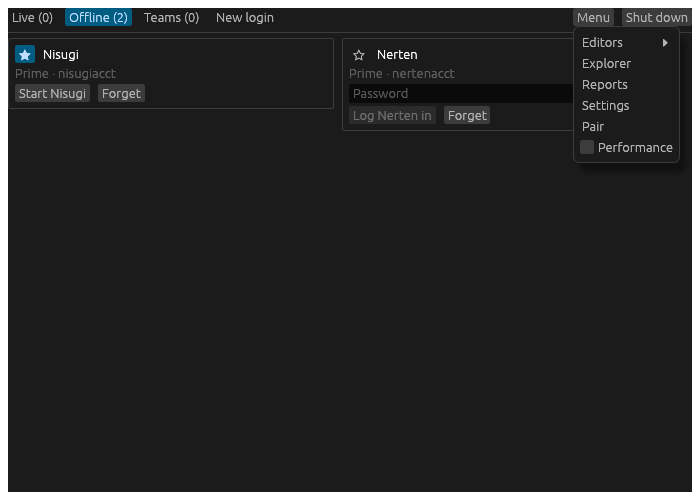
Every play window has a Menu on its title bar too, so either one reaches everything with the other closed.
- Editors: a list of every editor, each a page of the Editors window: Keybinds, Macros, Aliases, Hotbars, Themes, Triggers, the Controller, Packs, Icons and Cards. Cards is the design every character’s card is drawn from, which parts it shows and where; a value from the game state on it takes a colour for its words and one behind them. A trigger answers what the game says: it colours or hides a line, plays a sound, shows a banner, starts a timer or sends a command. Packs are pictures to fetch: frames, the Injuries doll, compasses. From a play window, an editor works for its character.
- Layout, on a play window: add a widget or a custom window, lay the windows out afresh, switch Arrange and Lock, set the Grid windows snap to, how strongly its Grid lines show and the Veil over a custom window’s cells while arranging, and Title bar settings, Settings at the window’s title bar.
- Logs, on a play window: what its character has read.
- Explorer: the Map Explorer, the whole map and where every character stands, and the bestiary.
- Reports: every report the ledger answers.
- Settings: Hydra’s own settings, and every character’s. From a play window, Settings opens on that character.
- Pair: a window with the web page’s address and a code for a phone’s camera to scan, and Copy for the address. While the web page is not served, it says so and Serve it switches it on, as the Web page switch on Hydra’s General page in Settings does.
- Performance, on the hub: each live card’s timings, for when something feels slow.
A new play window’s title bar shows its character, how it is connected, the Menu and the zoom’s − and +. Anything the Menu holds can be put back on the bar as a button of its own – Lock, Arrange, the Layout, Keys and Drawers menus, Log, Settings – and so can an icon for each drawer, lit while it is open: on the character’s Window page in Settings.
Settings chooses how things behave; the Editors window is where things are made. Settings lists its pages down its side; the Editors window has its editors as tabs along its top. Its For, at the end of that row, picks whose keys, macros, hotbars and controller its pages work on: every character’s, or one character’s own.
Shutting down
Shut down quits every character in turn and closes Hydra. With any character playing, it asks first: Shut Hydra down? Every character will quit.
Closing the hub’s window is not shutting down. It only hides the hub while a play window is open. With none open, Hydra rests in the background and every character plays on. Start Hydra again, or use the tray on Windows, to bring the hub back.