Hydra in the tray
On Windows, Hydra’s icon sits in the tray for as long as Hydra runs, its windows open or not. Hovering it says how many characters are playing.
A click on the icon opens the hub. Its menu:
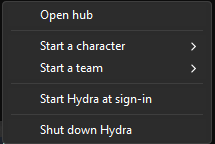
- Open hub.
- Start a character: every roster character whose password is kept.
One already playing is marked
*, and choosing it brings its window forward. - Start a team: your teams.
- Start Hydra at sign-in: Hydra starts by itself, resting, when you sign in to Windows, with its files in the folder it is running from now. Untick it to stop that.
- Shut down Hydra: every character quits the game, and Hydra closes.
A character or team started from the tray opens its play windows and leaves the hub as it is.
On a Mac or on Linux there is no tray icon. Hydra rests in the background in the same way, and starting it again opens its hub; on a Mac, see Install Hydra for how.