Streams
The game sends each line to a stream: most to the story, some to Thoughts, Speech, Arrivals and the rest, each a window you can add. Stream rules change where a line goes: a line the game puts in the story that belongs with the ambients, or lines you want in a window of their own, such as your fights.
A rule finds its lines and sends them to a stream. It moves them, out
of where the game sent them, or copies them, so they show in both. The
rules are one list for every character, kept in stream_rules.toml in
Hydra’s data folder, and tried in order: the first that matches a line
sorts it.
The log follows the rules too: a line a rule moved is written as
main/ambients, where the game sent it, then where it went.
What a Lich script writes, its own words beside the game’s, is sorted by the same rules: a rule that finds a script’s line moves or copies it like the game’s. A rule that asks for fighting, a search or a skin, or the combat reader’s mark is passed over for a script’s line, which comes in no chunk of the game’s that could say.
Fights in a window of their own
One rule is built in: Combat copies every line of the story that comes
while you fight to a stream named combat. Add its window from the play
window’s Menu › Layout › Add a widget, under Streams; the story keeps
the lines too. Edit the rule, or switch it off, on the Streams page. To
take fights out of the story, untick Keep fights in the story on the
combat window’s right-click menu.
A script’s attacks go with their fight: bigshot’s fire, cman or
incant, as Lich echoes them, when the answer was a fight. Each command
goes with the answer it got, however long that took: two sent at once are
answered one after the other, and each goes with its own. A gemstone list
or a cman that answers with no fight stays in the story. A stance or a
target, yours or a script’s, goes to combat with its answer while a hostile
creature is in the room. Your own typed attacks stay where you typed them.
The rule lists the words it goes by: Script attacks and Setting up,
shown while there is fighting is ticked.
A fear that makes you flee comes in one piece with the room you fled to. The fight goes where fights go; the room always stays in the story, so it still says where you are.
Searches and skins in a window of their own
A second rule is built in: Loot copies every line of a search or a
skin to a stream named loot, the creature fading away and the prompt with
it, and the loot, search or skin that asked for it, yours or a
script’s. Nothing leaves the story. The weapon swaps around a skin are no
search or skin, and stay where they are. A rules file made before the Loot
rule was built in is given it once; delete it on the Streams page and it
stays gone. Its condition, a creature is searched or skinned, is one any
rule can ask for.
Fights in the story
Each fight can be shown in the story as the game said it, told briefly, or left out, chosen apart for your own attacks, your other characters’, other players’ and creatures’. Told briefly, a fight is the attack’s first line, then for each target its rolls and its flares, the damage it took on the line that ended its turn, and how it was left:
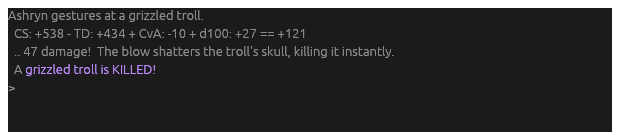
One line tells each attack on a line of its own, one for each target of a
spell that reaches several: You fire at a troll: +76 = +466, hit, 71 dmg, puncture R8 chest.
The combat window always has every line as the game said it. By default your own attacks and creatures’ are shown in full, and your other characters’ and other players’ are told briefly.
Choose on the Fights pages of the settings menu. Fights for every character sets them for everyone; a character’s own Fights page shows each as it is for that character, and a choice made there is that character’s alone until you put it back. Both pages also say whether fights and searches stay in the story as well as their windows: for every character that is the Combat and Loot rules’ own choice, and a character can choose otherwise for itself. Show the rolls and Show the flares leave a brief fight’s roll lines or flare lines out; Show the roundtime, off at first, puts its roundtime lines in.
Lines no reader knows
Hydra knows a fight from the attacks and their rolls, a search or a skin
from what it found. Some lines come with neither: a briar lashing a
creature, a hail of arrows still falling. Hydra learns these from the
fights it does know. Each sentence the game says is counted under what it
came with, a fight, a search or skin, or something else known, such as the
answer to a look. A line seen often enough only with fights takes its
lines to combat when it comes alone; seen with fights most of the time, it
is copied there and stays in the story too. A line seen with anything else
keeps its lines where they are.
When Hydra gets one wrong, right-click the line in the story or the combat
window and choose Part of this fight or Not part of this fight.
Lines like it go that way from then on, whatever was counted. Each choice
is kept in chunk_marks.toml in Hydra’s data folder, with the line, the
character, its player log and the time.
What Hydra counted is kept in chunk_kinds_prime.bin (one for each game)
beside it. To count afresh from every recording in the logs folder, shut
Hydra down and run hydra chunks learn. Your choices are kept.
Send a line somewhere else
Right-click the line, in a play window or in the log, and choose Send
lines like this to…, then the stream, or A stream of your own….
The Streams page opens with a rule made from the line: its words as they
are, but the names in it and its numbers loosened, so it takes the lines
like it. A grey warg howls 3 times. becomes a rule for any creature
howling any number of times.
The rule is not kept until you Save it. Look it over first: Try it holds the line, and says whether the rule’s words find it.
The Streams page
Open Menu › Editors › Streams.
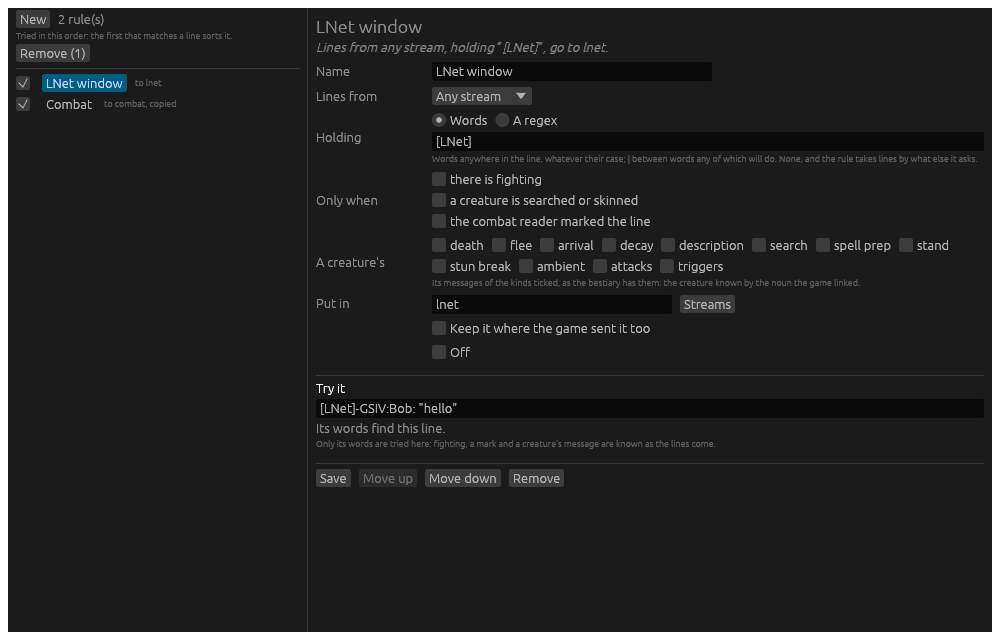
On the left, every rule in the order they are tried. The tick switches a rule on or off. A rule Hydra cannot use says not used; point at it to read why.
On the right, the rule chosen, or a new one from New:
- Lines from: the stream its lines come from: the story, one of the game’s, or any.
- Holding: Words anywhere in the line, whatever their case, with
|between words any of which will do; or A regex, a regular expression, where capitals count unless it starts(?i). - Only when: there is fighting, or the combat reader marked the line: a flare, a status landing on you, a killing blow.
- A creature’s: a creature’s own messages of the kinds ticked, its ambient flavour, its arrival, its death and the rest, as the bestiary has them.
- Put in: the stream: one of the game’s, or a name of your own. A stream of your own is offered in Add a widget, on the chat card and on the phone page as soon as a rule names it.
- Keep it where the game sent it too: the line is copied, not moved.
A rule needs everything it asks for to hold. Move up and Move down change the order. A new rule goes first, so it comes before the broad ones.
Past days in the log
The log keeps each line as it was written. A line written before a rule that takes it was made shows in the log window in the rule’s stream all the same, in a search and an export too: the rules sort it again by its words as it is read. A rule that asks whether there was fighting, or for the combat reader’s mark, cannot be tried on a past line, and is passed over.
The log window shows a past day as the story showed it: each line coloured by your highlights as they are now, a line a highlight hides left out, and the game’s blank lines between. Nothing sounds and no banner shows for a line read back. Show has a Highlights tick to see every line plain. A blank line is not a line of the file: the next line with words carries it, so a day’s file stays as short as before.
Triggers that moved lines
A trigger does not move its line: the stream rules do. A trigger that did, from Hydra before or brought from Vellum, is made a stream rule when Hydra reads it, under its own name, and the Streams page tells you so. Its other parts stay with the trigger, and a trigger that did nothing but move its line goes. A rule made this way is every character’s, whoever the trigger was for.