Pins
A pin keeps a colour exactly as you set it; everything else is made by the generator round it. Open Pins: every colour Hydra draws, by group.
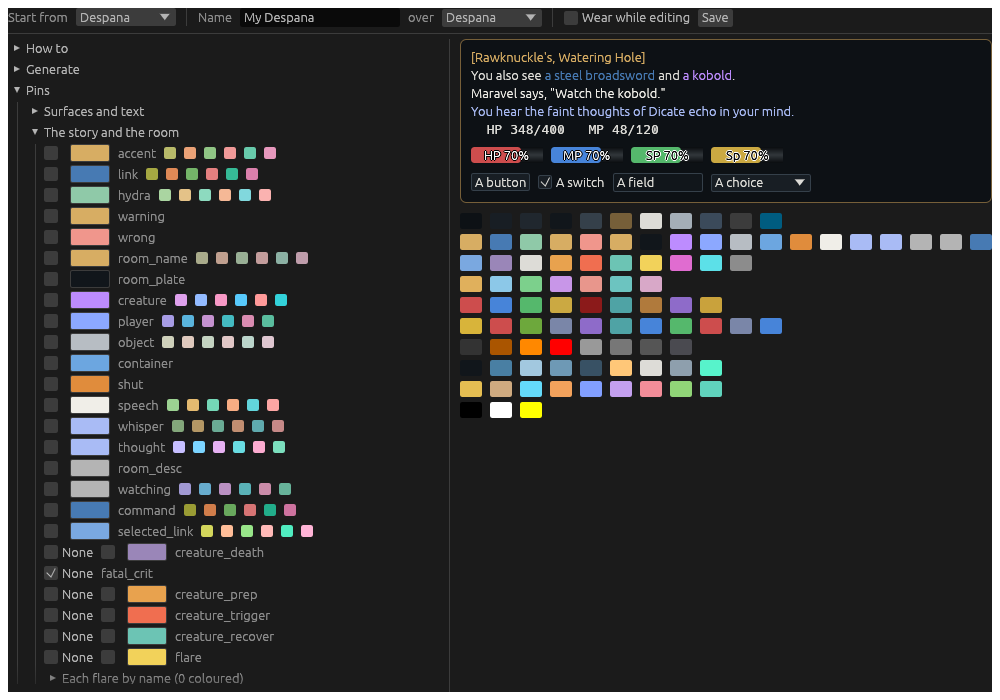
Each row is a colour’s box, its swatch and its name, and for many, a row of small swatches:
- Tick the box to pin the colour as it is now; untick it to let the generator make it again.
- Click the swatch to choose a colour: that pins it.
- The small swatches are other hues the generator could give it. A click pins one.
The groups
| Group | What it colours |
|---|---|
| Surfaces and text | the grounds, the edges, text and weak text, a selection, a tab and the shown tab |
| The story and the room | the accent, links, Hydra’s own words, warnings, the room’s name and its plate, creatures, players, objects, containers, speech, whispers, thoughts, commands, each kind of line, and a line’s time |
| Channels | a line said on Merchant, General, Help, Realm, OOC, Society or House, whole |
| Vitals | the bars |
| Status | the indicators and the lists of effects |
| Injuries | the doll |
| The map | the map’s rooms, lines, doors, you and the route |
| The map’s marks | the bank, the furrier, the gem shop and the other shops |
| Chrome | the veil and the grid drawn while arranging, part clear, and the calibrator’s mark on the doll |
Colours of one group are kept apart from each other, by Separation; colours of different groups may be alike, since they are never side by side.
None
A kind of line can be None: drawn as the story’s own text, with no colour of its own. The kinds are a creature’s death, a fatal crit, a creature preparing a spell, about to land a special, or recovering, a flare, a status landing on you, and each channel. Tick None beside it.
A fatal crit starts at None in every theme. A creature that cannot be crit to death dies by its death message, which is coloured as a death; the crit that killed one that can is a line of its own. Untick its None to give fatal crits a colour: it starts at the theme’s red, to change.
Each flare, each status, by name
Under flare and status_you, Each flare by name and Each status on you by name list every name the combat reader knows. Filter narrows the list. Tick a name to give it a colour of its own over its kind’s, or None to draw it plain; the count in the heading says how many have one. An acid flare can be green and a fire flare red, while the rest stay the flare colour.