How Hydra works
Hydra is one program that plays every character you have at once. Its windows are only views onto those characters: close them all and every character keeps playing.
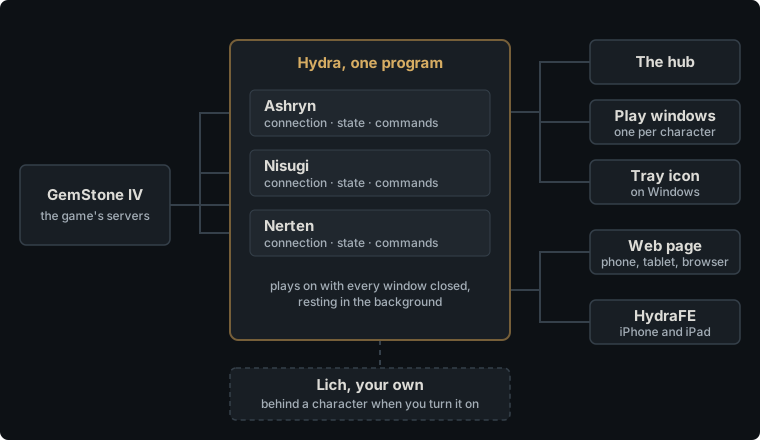
One Hydra, every character
A single Hydra holds every character’s connection to the game. Each character has a session of its own: the connection, everything the game has told it (its vitals, the room, its hands, its effects, its inventory), and the commands waiting to be sent. When a connection drops, Hydra logs that character back in by itself. A character nobody is using is let go once its connection has dropped twice with no command sent between, so an idle character is not logged back in forever.
You start, watch and stop characters from the hub. Each character can have a play window of its own, and several can play side by side.
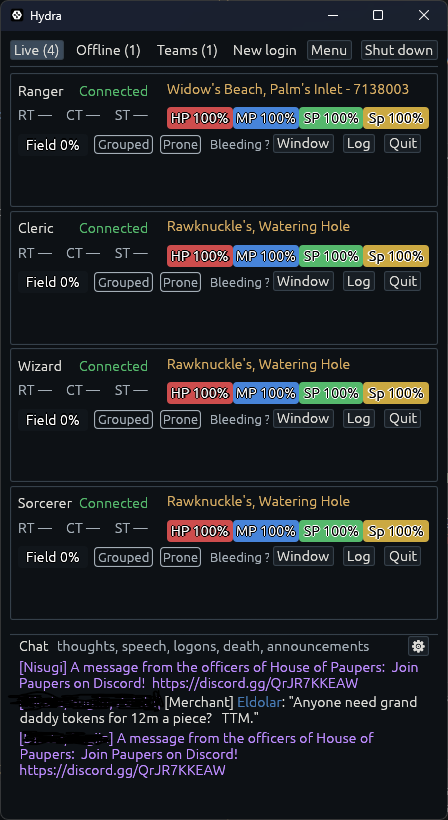
Windows come and go; the characters stay
Closing a play window does not stop its character. Closing the hub hides it while any play window is open. Once every window is closed, Hydra rests: it keeps running in the background, and every character keeps playing.
To bring the windows back, start Hydra again (on a Mac, see Install Hydra). Only one Hydra runs at a time on a set of files, so a second start does not begin another one: it opens the windows of the Hydra already running and leaves. On Windows, Hydra’s icon in the tray opens the hub as well, and Hydra can start by itself, resting, when you sign in.
Shut down, on the hub or the tray, is what ends Hydra: every character quits the game in turn, and then Hydra closes.
While a character plays, Hydra keeps Windows from going to sleep.
Starting fresh
Once the last character has stopped and no window is open, Hydra waits a minute and then starts itself again in the background. That gives back the memory that playing and the windows took, which a program can only hand back by ending. You do not see it happen. The wait is Start fresh after, in seconds, on Hydra’s General page of Settings; 0 turns it off. An update Hydra has downloaded takes over at this point too.
Hydra’s commands and the game’s
Anything you type goes to the game, except lines that start with Hydra’s
command symbol, ., which are Hydra’s own and never reach the game. .help
lists them. If you run Lich, lines that start with ; are Lich’s.
Logs on disk
Hydra keeps a player log for each character, a file a day, switched on
its own Logs settings page, and records the wire when recording
is on. Both gather in memory and go to disk every five minutes, and when
the session ends. .savelogs puts the character’s
own on disk right then, and .all .savelogs every character’s.
Lich
If you play with Lich, Hydra runs your own Lich behind any character you turn it on for. Hydra keeps the game connection and hands Lich the game’s text, so Lich’s scripts run as they always have, and what you type passes through Lich on its way to the game. Lich never sees your password.
The web page and the phone
Hydra can serve a web page to your home network. A phone, a tablet or another computer opens it in a browser and plays the same characters, from the same sessions, as the play windows show them. Menu › Pair shows its address and a code to scan, and serves it if it is not served yet.
HydraFE, the app for iPhone and iPad, does that too: it finds Hydra on your home network by itself. It can also run Hydra on the phone alone, with no computer, for when you are away from home. Lich does not run on a phone.
Where Hydra keeps its files
Hydra keeps two folders beside where it starts (on a Mac, in Application
Support): data, which holds your settings, layouts, triggers and the
characters it knows; and logs, which holds what each character read, a
file a day. Install Hydra
says where to put them. Passwords are never in either: Hydra keeps one only
when you ask, in your computer’s own keyring.