Triggers
A trigger watches what the game says. When a line holds the words you gave it, it acts: it colours the words, hides the line or writes it another way; it plays a sound, shows a banner or a notification, speaks, rumbles the controller or places a picture; it starts a timer, sets a flag or a status, or sends commands to the game. A line is moved to a window of its own by a stream rule. A trigger can watch your character instead of the text, and act when its health falls under half.
This chapter goes through the editor, then how a trigger finds its line, everything it can do, and examples of each kind, each with a line from the game to try it on.
Where they are
Open Menu › Editors › Triggers, on the hub or on any play window’s title bar: the Editors window opens at it.
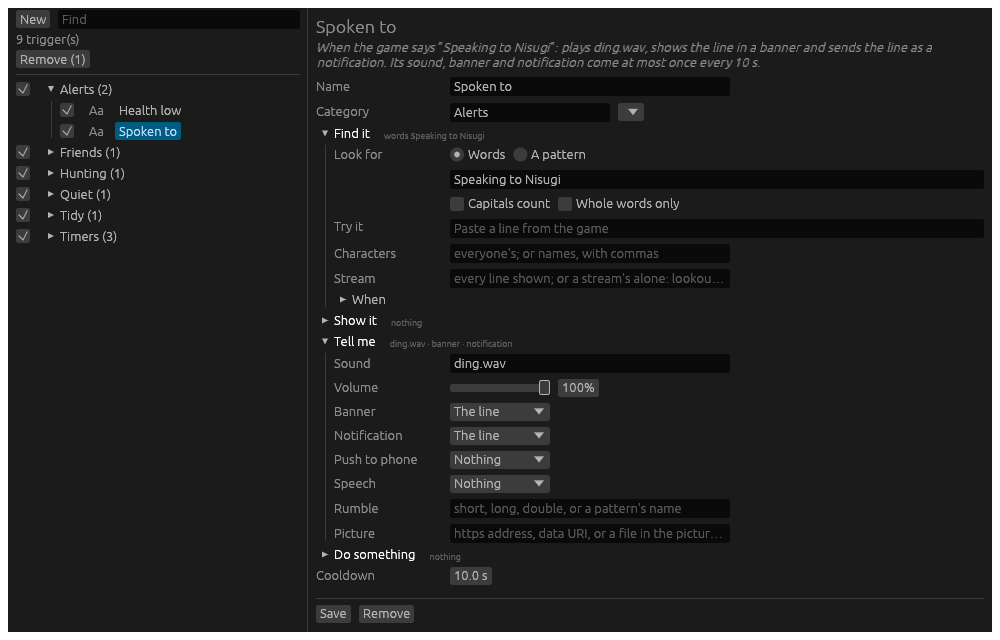
On the left, every trigger, by category:
- The tick beside a trigger switches it on or off. The tick beside a category switches every trigger in it.
- Find narrows the list to triggers whose name, category or words hold what you type.
- Aa shows a trigger’s colours.
- Click a trigger to open it in the form.
A new trigger
New asks what the trigger should do, and starts one ready for it.
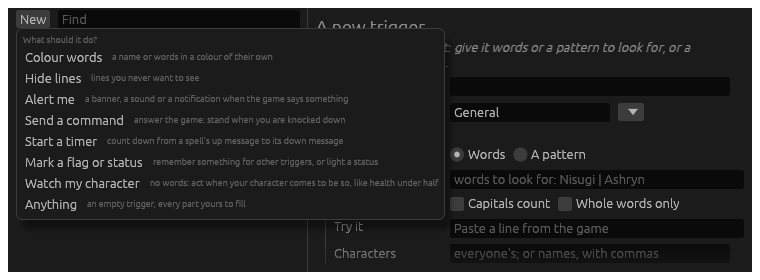
| Kind | Starts with |
|---|---|
| Colour words | a colour, to change |
| Hide lines | the line hidden |
| Alert me | a banner of the line |
| Send a command | Do something open |
| Start a timer | Do something open |
| Mark a flag or status | Do something open |
| Watch my character | no words; health under half, shown in a banner |
| Anything | nothing at all |
Whichever you start from, every part of a trigger is there to use.
The form
At the top, a sentence says what the trigger does as it stands, and follows every change you make:
When the game says “Speaking to Nisugi”: plays ding.wav, shows the line in a banner and sends the line as a notification. Its sound, banner and notification come at most once every 10 s.
Read it before you save: it is the quickest way to see a trigger does what you meant.
Then its Name, and its Category: type a new one, or pick one from the list beside it. Under them, the trigger’s parts in four sections:
- Find it: what it looks for, a line to try it on, whose it is, and when it may act. See Finding the line.
- Show it, Tell me and Do something: what it does. See What a trigger does.
A folded section says what is in it, or nothing. A trigger opens with the sections it uses open.
Save keeps it, and it works at once on every character it is for. Remove takes it away.
From the command line
.trigger help in a play window lists what the command does:
.trigger list: the categories;.trigger list <words>, the triggers whose name, category or words hold them..trigger on <name>and.trigger off <name>: a trigger, or a whole category..trigger remove <name>: take a trigger away..trigger import <file>: bring in Wrayth’s or Vellum’s highlights; see Bring your setup.
.highlight is another name for .trigger. Triggers are kept in
highlights.toml, in Hydra’s data folder.